
Custom 404 Pages (per language)
If a reader hits a broken or missing doc URL under your docs base slug, WP Super Docs shows its own branded 404 page instead of your theme’s generic one, with the full docs layout (topbar, search box, sidebar) still in place so they can recover.
This only applies to docs URLs#
Only 404s under your docs base slug (/docs/... by default) are affected. A missing URL anywhere else on your site still shows your theme’s normal 404 page, untouched.
Editing the content#
Go to WP Super Docs → Settings → Display → 404 page. The content is edited in a rich text editor (Visual and Text tabs, same as WordPress’s classic editor), with the usual formatting tools and a media button for inserting images.

A small search box is already part of the topbar on this page automatically, so you don’t need to add your own.
Per-language content#
If WPML or Polylang is active with more than one language, the editor is replaced with a set of tabs: Default (fallback), plus one tab per active language.
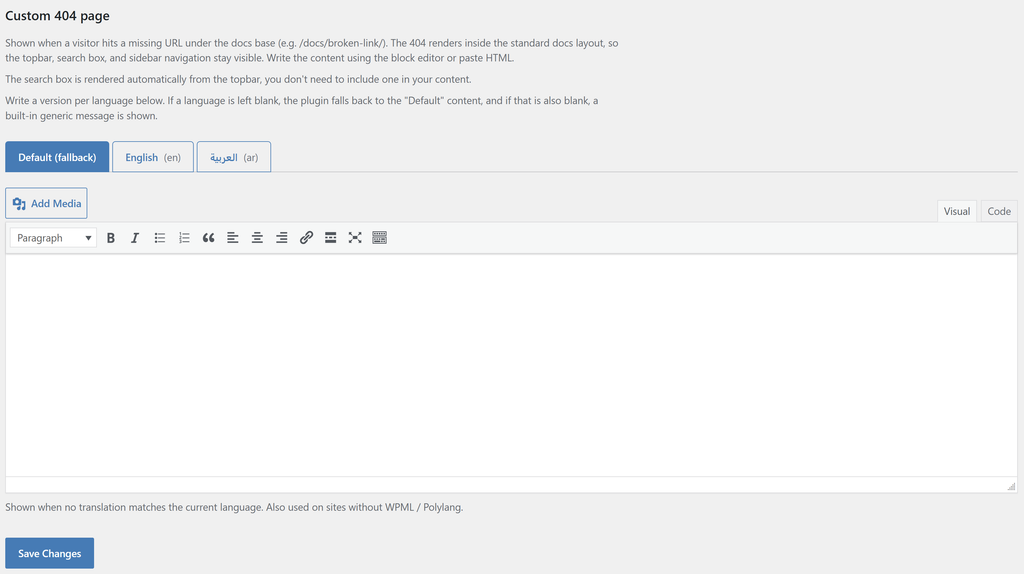
Write a version for as many languages as you want. The lookup order when a 404 actually happens is:
- Content for the visitor’s current language, if you’ve written any.
- Content for your site’s default language, if the current language’s tab is empty.
- The Default (fallback) content.
- A built-in generic message, if you haven’t written anything at all.
You don’t have to fill in every language, leaving a tab blank just falls through to the next step in that order.
What readers see#

The 404 still returns a real 404 Not Found status to browsers and search engines (so broken links get correctly dropped from search indexes over time), while showing your custom content instead of a dead end. The sidebar shows your first product’s navigation, so a reader landing here isn’t looking at a completely bare page.
Was this helpful?
Thanks for your feedback!
✓ Feedback received. Thank you!