
Enabling AI Search
AI features in WP Super Docs actually covers three separate, independently-toggled capabilities. It’s worth understanding the difference before turning any of them on, since enabling one doesn’t automatically enable the others.
The three toggles#
Go to WP Super Docs → Settings → AI:
- Enable AI features: the master switch. With this on, doc authors see a Generate Summary button in the doc editor. This alone doesn’t show anything to readers yet.
- Show summaries to readers: displays the generated summary at the top of a doc’s page, for any doc that already has one saved. This is separate from the master switch on purpose, so you can generate and review summaries privately before deciding to publish them.
- Enable Ask AI widget: shows an “Ask AI” button on the docs frontend, letting readers ask a question in plain language and get an AI-generated answer with links back to the source docs it drew from. This is the closest thing to “AI search,” a conversational alternative to typing keywords into the regular search box.

You can turn on just the summary features, just Ask AI, or both, they don’t depend on each other beyond both requiring the master switch and a working AI provider.
Setting up a provider#
Before any of this works, WP Super Docs needs an actual AI provider to call:
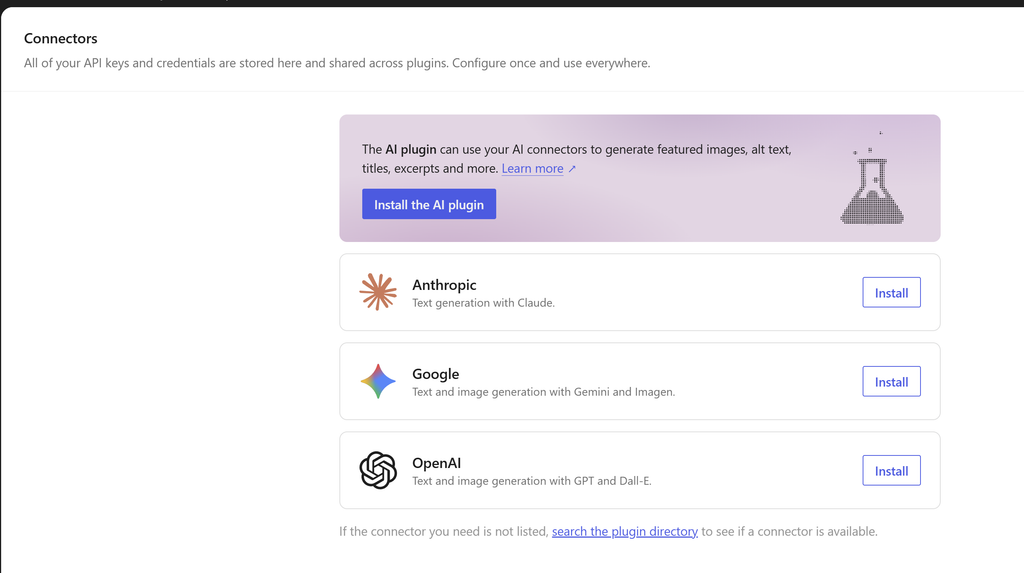
- On WordPress 7.0 or later: if WordPress’s own built-in AI client is detected, a green notice tells you so, and you configure your provider at WordPress Settings → Connectors instead. No API key needed inside WP Super Docs itself.
- On WordPress 6.x: you’ll need to provide your own API key for OpenAI, Anthropic, or Google Gemini directly in the AI settings tab. See Connecting OpenAI or Connecting Anthropic for the exact steps.
Summaries don’t cost tokens on every view#
Once a summary is generated for a doc, it’s stored permanently and reused, it doesn’t call the AI provider again on every page view. A new call only happens if the doc’s content has actually changed since the summary was generated, or the configured cache TTL has elapsed. This makes the summary feature cheap to leave on even for a large, frequently-viewed docs site.
Was this helpful?
Thanks for your feedback!
✓ Feedback received. Thank you!